
The Taplio invoice landed in my inbox, and I did what I do with any recurring cost I haven't thought about in a while: I actually looked at it.
€50 per month. €600 a year. For a tool I was using to schedule LinkedIn posts and check analytics.
Not the AI content features. Not the engagement pods. Not the DM automation. Just two things: scheduling and a dashboard. That stopped making sense, so I cancelled.
What followed was a few hours hitting the same wall, and then building something better instead.
What I was actually paying for
Taplio is a good product. If you use its full feature set, the price is defensible. But the tool has evolved toward AI content generation and LinkedIn growth features, and I was not using any of that. I write my own posts. I have no interest in AI-written drafts or growth hacking tactics. The product had moved in a direction that wasn't mine.
What I actually used: the scheduler and the analytics. That's 20% of the product at 100% of the price.
Replacing the scheduler was straightforward. Typefully does the job cleanly. It is focused on scheduling, not features nobody asked for. The pricing is reasonable, migration took less than an hour, and I have not missed anything.
The analytics were a different problem.
Looking for a Taplio alternative
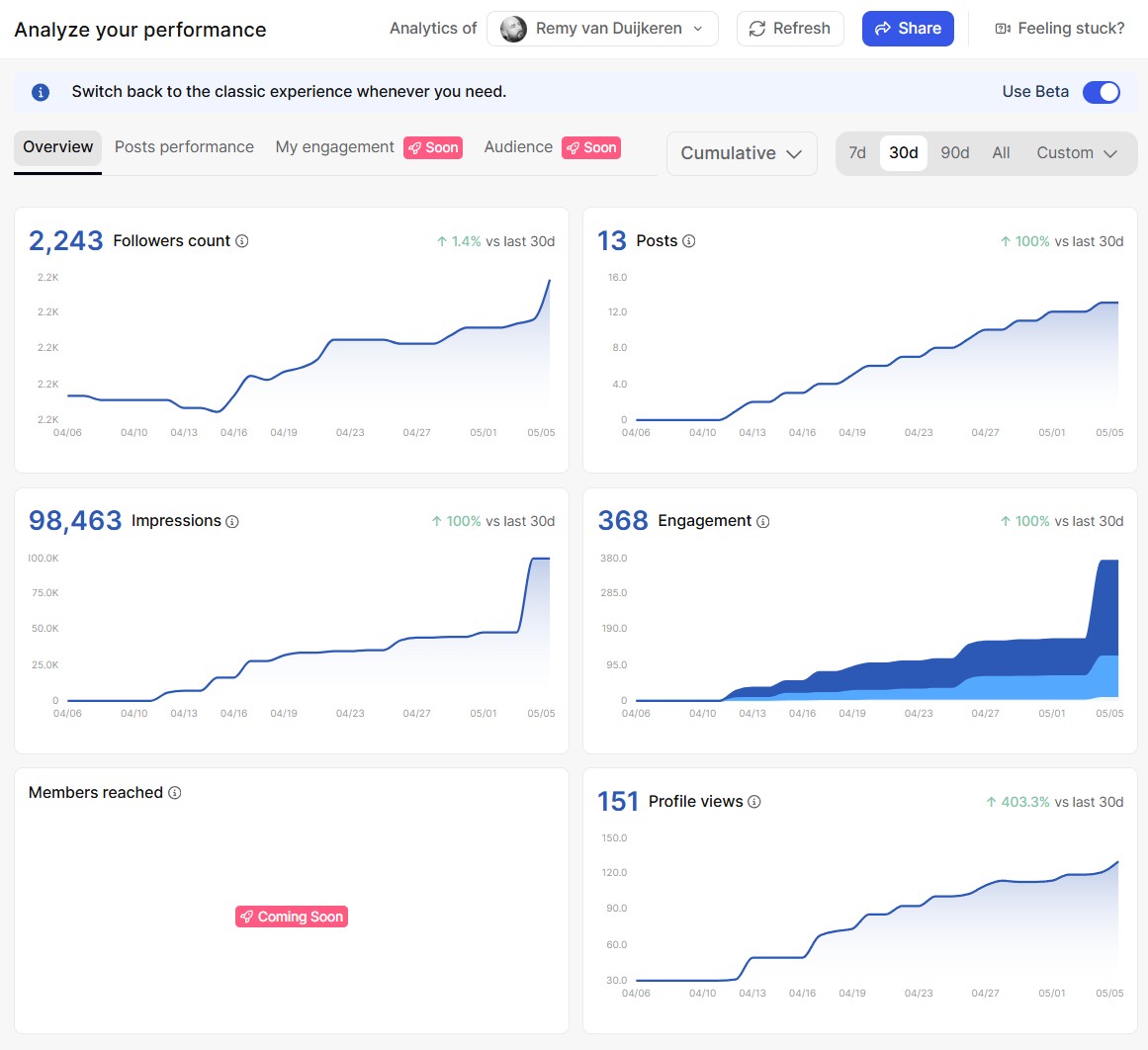
Taplio's dashboard gives you real visibility: follower growth over time, impressions, post performance, demographic breakdowns. Once I cancelled, that was gone.
The obvious answer was to find a Taplio alternative that handled the analytics side. I looked at Shield. Good product, purpose-built for LinkedIn analytics, similar price to what I had just cancelled. Then a couple of others. Every LinkedIn analytics alternative I found was another €20-50 per month to see data that is, when you stop and think about it, already mine.
There is a whole category of SaaS tools built around one idea: ingest your LinkedIn data, put it in a chart, charge you monthly for the privilege. As a business model, it works. As a value proposition for a solo consultant who checks analytics once a week, it starts to feel thin.
At some point you stop looking for the right Taplio alternative and start asking a different question.
What LinkedIn actually gives you for free
Here is something most LinkedIn analytics tools prefer you don't think about too hard: LinkedIn already gives you the underlying data. For free.
Go to linkedin.com/analytics, hit the export button, and you get two xlsx files: audience analytics and content analytics. 365 days of data. Follower growth, impressions, engagement rates, post-level performance. All of it, sitting there.
There is also a per-post export available through the three-dot menu on any individual post. This gives you richer data: members reached, saves, reposts, link clicks, followers gained from that specific post, and demographic breakdowns per post. It is not as convenient as a live dashboard, but the data is there.
The LinkedIn analytics alternative you have been looking for is LinkedIn itself. The tools are just the presentation layer.
The build
I dropped the export files into a Cowork session with Claude and gave it a brief: here is the data structure, here is what I want to see. Follower growth. Monthly impressions. Top posts table. Period selectors. vs-previous-period deltas.
The project has a simple folder structure: inbox/ for new xlsx drops, data/ for processed JSON, pages/ for HTML output. A CLAUDE.md file acts as the project brain. It describes the data schema, the dashboard behaviour, and what to do when new data arrives. That is the detail that makes this a repeatable workflow rather than a one-off experiment. Without it, each session starts from scratch. With it, dropping a new export and running Claude is a two-minute job.
The first working LinkedIn analytics dashboard came out of the first session. It was not perfect. A few more iterations to get the post table right, tune the period selectors, add dark mode. But it was useful from the start, and each refinement took minutes not hours.
What I ended up with
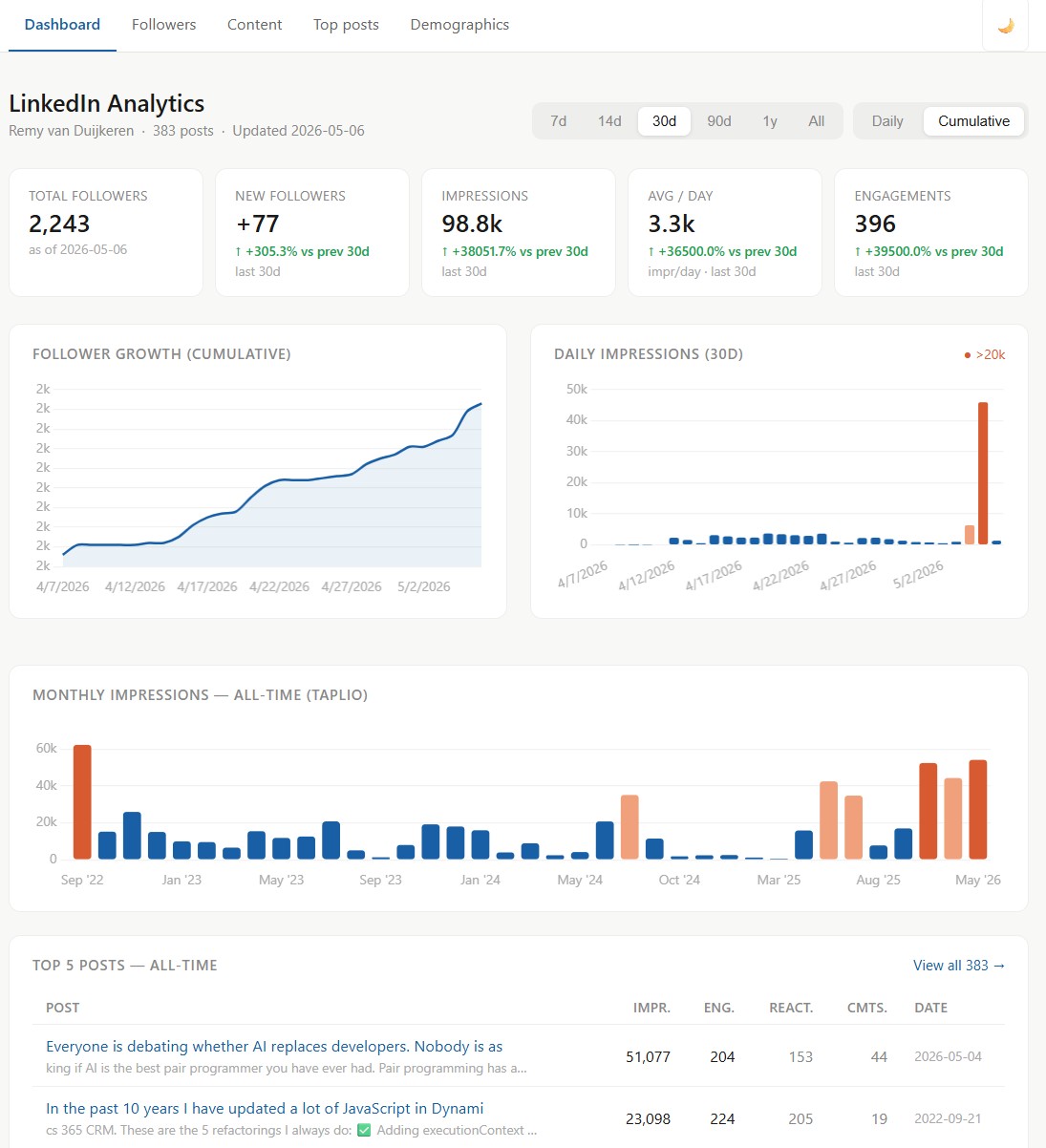
The dashboard has follower growth with a daily/cumulative toggle, monthly impressions, a top posts table with enriched per-post data, period selectors from 7 days to all-time, and delta comparisons against the previous period. Light and dark mode because I look at it often enough to care.
In early May, one post hit 51,148 impressions. That spike sits in the chart like a coral bar twice the height of everything around it. It is the kind of thing that makes you quietly pleased with your own tooling.
For what I actually needed, this is a better outcome than any Taplio alternative I found. It does fewer things, but the things it does are exactly what I need. Total monthly cost: €0.
The honest trade-off
The one real friction point: the export is manual. LinkedIn has no public API for this data, so there is no way to automate the fetch. Every week, you open LinkedIn Analytics, click export, drop the file in the folder.
For a solo consultant checking analytics once a week, that is three minutes of overhead. It does not bother me.
If you need real-time data piped into a reporting tool, or you are managing multiple LinkedIn accounts, this does not scale. That is worth being honest about before you start. But for the common case, one person and one profile wanting to understand what is working, the manual download is a non-issue.
Try it yourself
The data is already there. Go to linkedin.com/analytics, download the export, and ask Claude to build something useful with it. You do not need to write code. You do not need another subscription.
LinkedIn gives you the raw data for free. You just need to know where to look, and something to help you build with it.
If you want to replicate the setup, I've published the CLAUDE.md I use for this project. It describes the folder structure, data schema, workflow, and dashboard spec — everything Claude needs to build and maintain the dashboard from your exports. Download it here